

扫码购买正式版题库
- 海量题库
- 全真模拟
- 专项训练
- 预测试题
- 押题密卷
- 错题强化

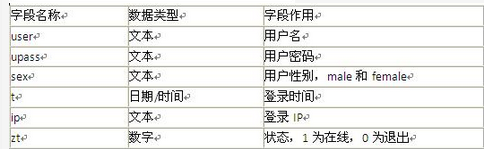
【说明】访问某聊天系统必须先注册,然后登录才可进行聊天。图4-1为注册页面,注册时需要输入用户名和密码及性别信息,数据库将记录这些信息。表4-1为利用Microsoft access创建的数据库msg,数据库记录用户名、密码、性别、登录时间,IP地址及状态信息.
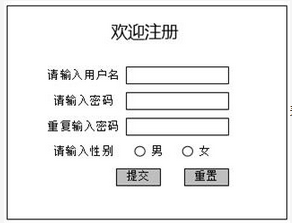 表4-1 数据库创建的字段
 以下是图4-1 所示页面的部分代码,请仔细阅读该段代码,将(1)-(6)的空缺代码补齐。<% Set MM_editCmd=Server.CreateObject("ADODB.Command")MM-editCmd.ActiveConnection=MM_connbbs_STRINGMM_editCmd.CommandText="INSERT INTO msg([user],upass,sex)VALUES(?,?,?)"MM_editCmd.PrePared=trueMM_editCmd.Parameters.AppendMM_editCmd.CreateParameter("param1",202,1,225,Request.Form("user"))"adVarWCharMM_editCmd.Parameters.AppendMM_editCmd.CreateParameter("param2",202,1,225,Request.Form("( 1 )"))"adVarWCharMM_editCmd.Parameters.AppendMM_editCmd.CreateParameter("param3",202,1,225,Request.Form("sex"))"adVarWCharMM_editCmd.ExecuteMM_editCmd.ActiveConnection.Close%>< body>< from ACTION="<%=MM_editAction%>"METHOD="( 2 )"id="form1" name="form1">< p align="center">欢迎注册</p>< table width="500" border="0" align="center"cellpadding="1"cellspacing="2">< tr><td><div align="right">请输入用户名</div></td>< td> <input type="text"name=" ( 3 )"id="user"/></td>< /tr><tr>< td><div align="right">请输入密码</div></td>< td> <input type=" ( 4 )"name="upass"id="upass"/></td>< /tr><tr>< td><div align="right">重复输入密码</div></td> <td> <input type="text"name="pass2"id="pass2"/></td>< /tr><tr>< td><div align="right">请输入性别</div></td>< td> < input name="sex" type="radio "id="radio" value=" ( 5)"/>< lable for="sex">男<input type="radio" name="sex" id="radio2" value="female"/>女</label></td></tr><tr>< input type="submit" name="button" id="button" value="提交"/>< input type=" ( 6)"name="button2"id="button2"value="重置"/></td></tr>< /table>(1)~(6)备选答案:A.reset B.male C.postD.text E.user F.upass【问题2】(9分)用户注册成功后的登录页面如图4-2所示。系统检查登录信息与数据库存储信息是否一致,如果一致则转到登录成功页面succ.asp。如果不一致则显示"警告:您输入的信息有误!"下面是信息显示页面的部分代码,请将下面代码补充完整。
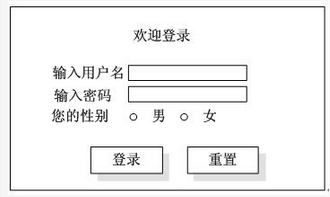 <%Set conn=server.createobject("adodb.connection")Conn.Open"Provider=Microsoft.Jet.OLEDB.4.0;Data Source=C:\wwwroot\bbs.mdb"If request.form("user")<>""thenU=request.form("user")P=request.form("upass")S=request.form("sex")Set rs=server.createobject("adodb.recordset")rs.open "select" * from msg where(7)="&u&" and(8)="&p&" andSex="&s&""",conn,1,3If.rs.(9)and rs.bof thenResponse.(10)("警告:您输入的信息有误!")Elsers("t")=(11)()rs("(12)")=request.ServerVariables("remote_host")rs("zt")=1rs.updatesession("user")=usession("(13)")=sresponse.(14)"suss.asp"end ifrs.close()set rs=nothingend if%>
< body>< form id="form1"name="form1"method="post" action="user.asp">< p align="center">欢迎登陆</p>< div align="center"<td><div align="right">输入用户名</div></td>< td><label for="user"></label>< input type="text"name="user" id="user"/>& nbsp;</td>< td><div align="right">输入密码</div></td>< td><label for="upass"></label>& nbsp;< input type="text"name="upass"id="upass"/></td>< td><div align="right">您的性别</div></td>< td> < input name="sex" type="radio" id="radio" value="male" checked="(15)"/>< label for="sex">男<input type="radio" name="sex" id="radio2" value="female"/>女</label></td>< td> </td>< td> < input type="submit" name="button" id="button" value="登陆"/> < input name="button2" type="submit" id="button2" onclick="MM_goToURL("parent",index.asp");return document.MM_returnValue" value="返回"/></td></tr>(7)~(15)备选答案:A.now B.ip C.checked D.eof E.upassF.user G.write H.sex I.redirect
<%Set conn=server.createobject("adodb.connection")Conn.Open"Provider=Microsoft.Jet.OLEDB.4.0;Data Source=C:\wwwroot\bbs.mdb"If request.form("user")<>""thenU=request.form("user")P=request.form("upass")S=request.form("sex")Set rs=server.createobject("adodb.recordset")rs.open "select" * from msg where(7)="&u&" and(8)="&p&" andSex="&s&""",conn,1,3If.rs.(9)and rs.bof thenResponse.(10)("警告:您输入的信息有误!")Elsers("t")=(11)()rs("(12)")=request.ServerVariables("remote_host")rs("zt")=1rs.updatesession("user")=usession("(13)")=sresponse.(14)"suss.asp"end ifrs.close()set rs=nothingend if%>
< body>< form id="form1"name="form1"method="post" action="user.asp">< p align="center">欢迎登陆</p>< div align="center"<td><div align="right">输入用户名</div></td>< td><label for="user"></label>< input type="text"name="user" id="user"/>& nbsp;</td>< td><div align="right">输入密码</div></td>< td><label for="upass"></label>& nbsp;< input type="text"name="upass"id="upass"/></td>< td><div align="right">您的性别</div></td>< td> < input name="sex" type="radio" id="radio" value="male" checked="(15)"/>< label for="sex">男<input type="radio" name="sex" id="radio2" value="female"/>女</label></td>< td> </td>< td> < input type="submit" name="button" id="button" value="登陆"/> < input name="button2" type="submit" id="button2" onclick="MM_goToURL("parent",index.asp");return document.MM_returnValue" value="返回"/></td></tr>(7)~(15)备选答案:A.now B.ip C.checked D.eof E.upassF.user G.write H.sex I.redirect
 表4-1 数据库创建的字段
 以下是图4-1 所示页面的部分代码,请仔细阅读该段代码,将(1)-(6)的空缺代码补齐。<% Set MM_editCmd=Server.CreateObject("ADODB.Command")MM-editCmd.ActiveConnection=MM_connbbs_STRINGMM_editCmd.CommandText="INSERT INTO msg([user],upass,sex)VALUES(?,?,?)"MM_editCmd.PrePared=trueMM_editCmd.Parameters.AppendMM_editCmd.CreateParameter("param1",202,1,225,Request.Form("user"))"adVarWCharMM_editCmd.Parameters.AppendMM_editCmd.CreateParameter("param2",202,1,225,Request.Form("( 1 )"))"adVarWCharMM_editCmd.Parameters.AppendMM_editCmd.CreateParameter("param3",202,1,225,Request.Form("sex"))"adVarWCharMM_editCmd.ExecuteMM_editCmd.ActiveConnection.Close%>< body>< from ACTION="<%=MM_editAction%>"METHOD="( 2 )"id="form1" name="form1">< p align="center">欢迎注册</p>< table width="500" border="0" align="center"cellpadding="1"cellspacing="2">< tr><td><div align="right">请输入用户名</div></td>< td> <input type="text"name=" ( 3 )"id="user"/></td>< /tr><tr>< td><div align="right">请输入密码</div></td>< td> <input type=" ( 4 )"name="upass"id="upass"/></td>< /tr><tr>< td><div align="right">重复输入密码</div></td> <td> <input type="text"name="pass2"id="pass2"/></td>< /tr><tr>< td><div align="right">请输入性别</div></td>< td> < input name="sex" type="radio "id="radio" value=" ( 5)"/>< lable for="sex">男<input type="radio" name="sex" id="radio2" value="female"/>女</label></td></tr><tr>< input type="submit" name="button" id="button" value="提交"/>< input type=" ( 6)"name="button2"id="button2"value="重置"/></td></tr>< /table>(1)~(6)备选答案:A.reset B.male C.postD.text E.user F.upass【问题2】(9分)用户注册成功后的登录页面如图4-2所示。系统检查登录信息与数据库存储信息是否一致,如果一致则转到登录成功页面succ.asp。如果不一致则显示"警告:您输入的信息有误!"下面是信息显示页面的部分代码,请将下面代码补充完整。
 <%Set conn=server.createobject("adodb.connection")Conn.Open"Provider=Microsoft.Jet.OLEDB.4.0;Data Source=C:\wwwroot\bbs.mdb"If request.form("user")<>""thenU=request.form("user")P=request.form("upass")S=request.form("sex")Set rs=server.createobject("adodb.recordset")rs.open "select" * from msg where(7)="&u&" and(8)="&p&" andSex="&s&""",conn,1,3If.rs.(9)and rs.bof thenResponse.(10)("警告:您输入的信息有误!")Elsers("t")=(11)()rs("(12)")=request.ServerVariables("remote_host")rs("zt")=1rs.updatesession("user")=usession("(13)")=sresponse.(14)"suss.asp"end ifrs.close()set rs=nothingend if%>
< body>< form id="form1"name="form1"method="post" action="user.asp">< p align="center">欢迎登陆</p>< div align="center"<td><div align="right">输入用户名</div></td>< td><label for="user"></label>< input type="text"name="user" id="user"/>& nbsp;</td>< td><div align="right">输入密码</div></td>< td><label for="upass"></label>& nbsp;< input type="text"name="upass"id="upass"/></td>< td><div align="right">您的性别</div></td>< td> < input name="sex" type="radio" id="radio" value="male" checked="(15)"/>< label for="sex">男<input type="radio" name="sex" id="radio2" value="female"/>女</label></td>< td> </td>< td> < input type="submit" name="button" id="button" value="登陆"/> < input name="button2" type="submit" id="button2" onclick="MM_goToURL("parent",index.asp");return document.MM_returnValue" value="返回"/></td></tr>(7)~(15)备选答案:A.now B.ip C.checked D.eof E.upassF.user G.write H.sex I.redirect
<%Set conn=server.createobject("adodb.connection")Conn.Open"Provider=Microsoft.Jet.OLEDB.4.0;Data Source=C:\wwwroot\bbs.mdb"If request.form("user")<>""thenU=request.form("user")P=request.form("upass")S=request.form("sex")Set rs=server.createobject("adodb.recordset")rs.open "select" * from msg where(7)="&u&" and(8)="&p&" andSex="&s&""",conn,1,3If.rs.(9)and rs.bof thenResponse.(10)("警告:您输入的信息有误!")Elsers("t")=(11)()rs("(12)")=request.ServerVariables("remote_host")rs("zt")=1rs.updatesession("user")=usession("(13)")=sresponse.(14)"suss.asp"end ifrs.close()set rs=nothingend if%>
< body>< form id="form1"name="form1"method="post" action="user.asp">< p align="center">欢迎登陆</p>< div align="center"<td><div align="right">输入用户名</div></td>< td><label for="user"></label>< input type="text"name="user" id="user"/>& nbsp;</td>< td><div align="right">输入密码</div></td>< td><label for="upass"></label>& nbsp;< input type="text"name="upass"id="upass"/></td>< td><div align="right">您的性别</div></td>< td> < input name="sex" type="radio" id="radio" value="male" checked="(15)"/>< label for="sex">男<input type="radio" name="sex" id="radio2" value="female"/>女</label></td>< td> </td>< td> < input type="submit" name="button" id="button" value="登陆"/> < input name="button2" type="submit" id="button2" onclick="MM_goToURL("parent",index.asp");return document.MM_returnValue" value="返回"/></td></tr>(7)~(15)备选答案:A.now B.ip C.checked D.eof E.upassF.user G.write H.sex I.redirect
问答题
【说明】访问某聊天系统必须先注册,然后登录才可进行聊天。图4-1为注册页面,注册时需要输入用户名和密码及性别信息,数据库将记录这些信息。表4-1为利用Microsoft access创建的数据库msg,数据库记录用户名、密码、性别、登录时间,IP地址及状态信息.
最新更新

热门题库
- 教师资格题库
- 审计师题库
- (中级)经济师题库
- BIM工程师题库
- 煤矿主要负责人题库
- 注册结构工程师题库
- 制冷与空调作业题库
- 证券分析师题库
- 演出经纪人题库
- 注册电气工程师题库
- 机械员题库
- 主治类题库
- 西式面点师题库
- 监理工程师题库
- 投资项目管理师题库
- 保育员题库
- 高处作业题库
- 卫生类题库
- 证券投资顾问题库
- 煤矿特种作业人员题库
- Q起重机械作业题库
- 研究生入学题库
- 监管人员执法题库
- 消防设施操作员题库
- D压力管道作业题库
- 陕西省-社区专职工作人员招聘题库
- 理财规划师题库
- 综合类题库
- 材料员题库
- 会计从业题库
- T电梯作业题库
- 危险化学品安全作业题库
- 消防工程师题库
- R压力容器作业题库
- 公用设备工程师题库
- 茶艺师题库
- 注册环保工程师题库
- 证劵从业(旧版)题库
- 环境影响评价工程师题库
- 一级建造师题库
- 药学类题库
- 基金从业资格题库
- 设备监理师题库
- 省公务员-行测题库
- 土地登记代理人题库
- (初级)经济师题库
- 质量工程师题库
- 营养师题库
- 初级会计职称题库
- 房地产经纪人题库
- 汽车驾驶员题库
- 焊工题库
- 质量员题库
- 资产评估师题库
- (中级)银行从业资格题库
- 企业人力资源管理师题库
- 报检员题库
- 烟花爆竹安全作业题库
- 会计从业资格考试题库
- 成考(专升本)题库
- 电工作业题库
- 银行招聘考试题库
- 中级会计职称题库
- 房地产经纪协理题库
- 二级注册建筑师题库
- 道路运输题库
- 中式烹调师题库
- G锅炉作业题库
- 国家公务员题库
- 焊工作业题库
- N厂内专用机动车辆作业题库
- 咨询工程师题库
- 成考(高起点)题库
- 法律职业资格(原司法考试)题库
- 煤矿班组长题库
- 公安政法干警题库
- 安全工程师题库
- 事业单位公开招聘题库
- 初级管理会计师题库
- 金属非金属矿山安全作业题库
- 护理类题库
- 报关员题库
- 中药学类题库
- 特种设备焊接作业题库
- 教师招聘题库
- 资料员题库
- 车工题库
- 钳工题库
- 安全员题库
- 物业管理师题库
- 注册城乡规划师题库
- 电工题库
- 检验类题库
- P气瓶作业题库
- 二级造价工程师题库
- 冶金(有色)生产安全作业题库
- 岩土工程师题库
- 招标师题库
- 同等学力申硕题库
- 军队文职人员招聘题库
- (高级)经济师题库
- 美容师题库
- 国家电网招聘题库
- 中级安全工程师题库
- 自考(医学)题库
- 高校教师资格证题库
- 房地产估价师题库
- 土木工程师(水利水电)题库
- 标准员题库
- 汽车修理工题库
- 石油天然气安全作业题库
- 建筑特殊工种题库
- 劳务员题库
- 理工类题库
- 税务师题库
- 统计师题库
- 证劵从业(新版)题库
- 卫生招聘考试题库
- 心理咨询师题库
- 健康管理师题库
- 煤矿安全管理人员题库
- 高级会计题库
- 注册会计师题库
- 注册测绘师题库
- 三支一扶题库
- (初级)银行从业资格题库
- 主要负责人题库
- 导游资格证题库
- 注册消防工程师题库
- 施工员题库
- 期货从业资格题库
- 试验检测师(含助理)题库
- 一级造价工程师题库
- 中式面点师题库
- 健康管理师题库
- 投资银行业务-保荐代表人题库
- 安全管理人员题库
- 安全员(三类人员)题库
- 二级建造师题库
- A特种设备安全管理题库
- 社会工作者题库
- 医师类题库
- 执业药师题库
- 一级注册建筑师题库
- 软件水平考试题库